Start with the work the robot must do in your home, then check whether the exact model, dock, and regional version can keep doing it. A long feature list or high suction claim does not answer whether a robot handles your rugs, fits under your furniture, avoids your obstacles, or has the parts and support you will need.
Write down your requirements
Separate requirements that would rule out a model from preferences that can be traded off. Include:
- Floors and layout: hard-floor and carpet areas, rug types, thresholds, narrow spaces, cables, and low furniture.
- Household conditions: pet hair, dust, noise tolerance, and any need to limit where the robot travels.
- Cleaning tasks: vacuuming only or mopping too, and whether you want the dock to empty, wash, dry, or refill.
- Ownership needs: dock footprint, water handling, app and network setup, camera or microphone features, data handling, account transfer, privacy and security information, replacement parts, and the support route.
Mark each as essential, preferred, or irrelevant. For example, a mop system adds little value if you do not want to handle pads, tanks, or dock maintenance. A self-emptying or wash dock may also change the space and recurring parts you need to plan for.
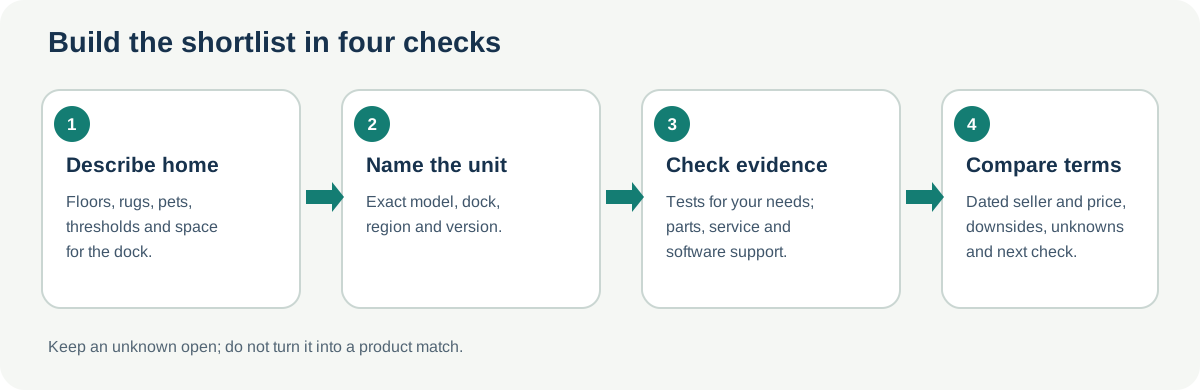
Check performance evidence against your home
Look for tests that match your actual requirements rather than one headline score. Useful dimensions include hard-floor and carpet pickup, pet hair, threshold and obstacle handling, mopping, app setup, noise, and the effort needed to clean the robot and dock. Read how the publisher created the test: a lab setup is a controlled comparison, not a promise of the same result in every home.
Test programs differ. CHOICE describes Australian-market tests for floors, pet hair, obstacle handling, mopping, and app use. Which? describes a UK program and says its robot-vacuum protocol changed in 2026, so older and newer results should not be read as a direct trend. RTINGS discusses maintenance and recurring-cost measures in its vacuum methodology. Consumer Reports says its model-level Overall Score combines test results with consumer-survey results, including predicted reliability and owner satisfaction, so it is not a lab score alone. For robot vacuums, predicted reliability projects problems or breakage over four years from survey data; this is not a four-year durability test. These methods answer related but different questions; do not average their scores or assume their tested models are sold as the same regional SKU.
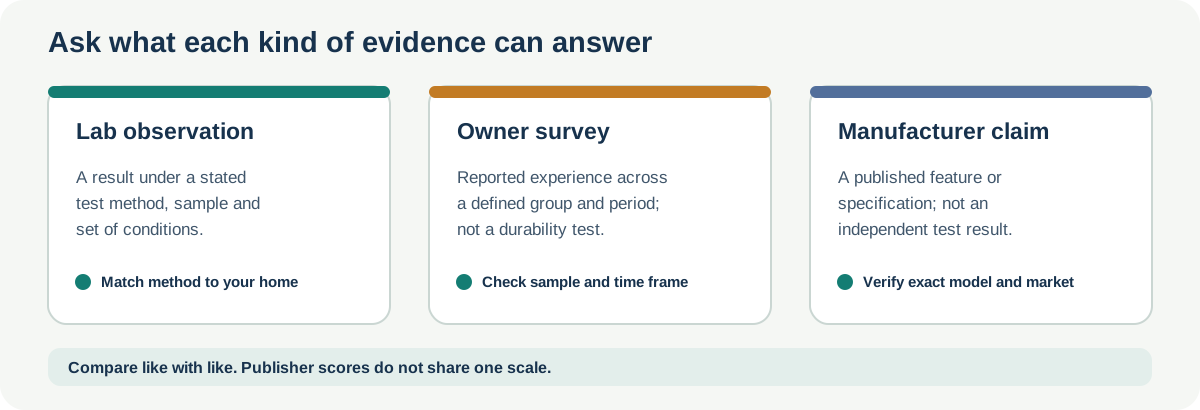
For more detail on reading test methods and scores, use How to compare robot vacuum tests and review scores.
Verify model and supportability
Before adding a model to your shortlist, record the exact model or SKU, dock pairing, country, and product version. Check the manufacturer’s manual and support pages for documented tasks, available parts, and any installation or service boundary. For example, iRobot’s feature and compatibility tables list family-specific features and part relationships, while a eufy US replacement-kit listing identifies variant and purchase-date exceptions. Recheck the exact listing and date; those examples do not establish fitment for another model or region. Do not infer compatibility from brand, appearance, or a similar family name.
Check support terms separately from advertised cleaning features. Record the purchase channel, warranty period and exclusions, service location, battery and dock availability, and whether the app or connected features you want have a stated support status. A service page for one country or one fault does not establish the route for a different model or region. For a used or refurbished model, also check the seller’s return terms, condition, and the official product-safety notices for the exact robot and dock.
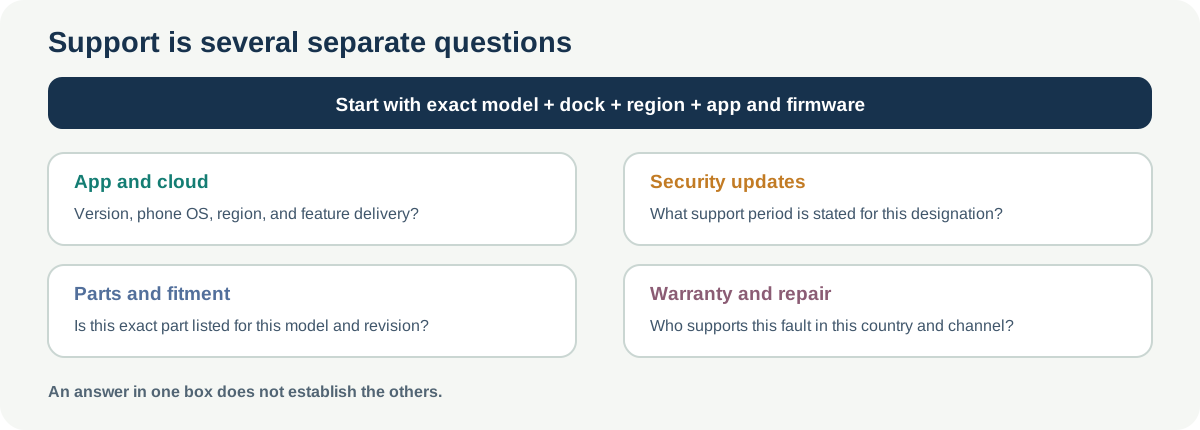
Check connected functions and installed space
A feature list can depend on accounts, internet access, region, and software. Bosch’s 2 September 2026 Spotless 2 announcement lists app controls for NoGo zones, room-cleaning order, and scheduling, as well as Matter integration. Its footnote says some functions require an internet-connected Home Connect account and SingleKey ID, but it does not identify every function affected or establish what is delivered with each UK product. Confirm the exact feature and its account, network, and integration requirements for the model and software you will receive. Do not assume that every basic cleaning run requires an account.
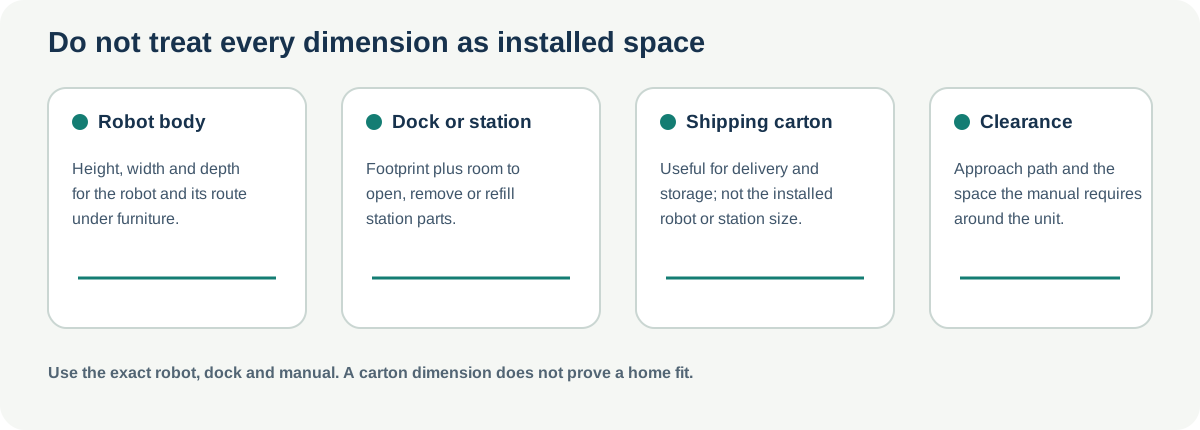
On the UK BCRDW3B product page, Bosch lists robot dimensions of 99 × 353 × 351 mm, station dimensions of 528 × 394 × 443 mm, and packed-product dimensions of 500 × 398 × 773 mm (H × W × D). The packed-product row describes the carton, not the installed footprint. Check the robot and dock dimensions and the manual’s operating-clearance requirements for the exact model; do not transfer these figures to another Bosch variant.
Connected features can depend on the app family and version, phone operating system, account or country region, and separate robot or dock firmware. Record the feature you want, the exact robot and dock, app name and version, phone platform, region, and each relevant firmware version; then confirm that the feature is actually available in that setup. iRobot’s Roomba Home release notes distinguish the Roomba Home app from its classic app and describe releases limited by platform or region. A release note describes rollout, not delivery to a particular model, bundle, account, or country. Check the exact model’s current support guidance and the app after setup before counting a connected feature as a reason to choose it.
Camera, microphone, app, and handover details can also affect a shortlist. For the first-generation ROMO P/A/S UK listing, DJI says the robot supports remote video and voice calls through the DJI Home app. The listing does not state their default status, data retention, or a control for disabling them. For Roomba Mini, iRobot’s UK page says data can be deleted when the robot is passed to a new owner, but does not detail the deletion scope or steps. For the exact model, check which controls exist, what they disable, which features require an app or network, and how to release an account and remove data before transfer. These product-page statements do not establish a privacy or security assessment; a button that starts a basic cleaning mission without Wi-Fi does not establish offline mapping, scheduling, voice, or camera functions.
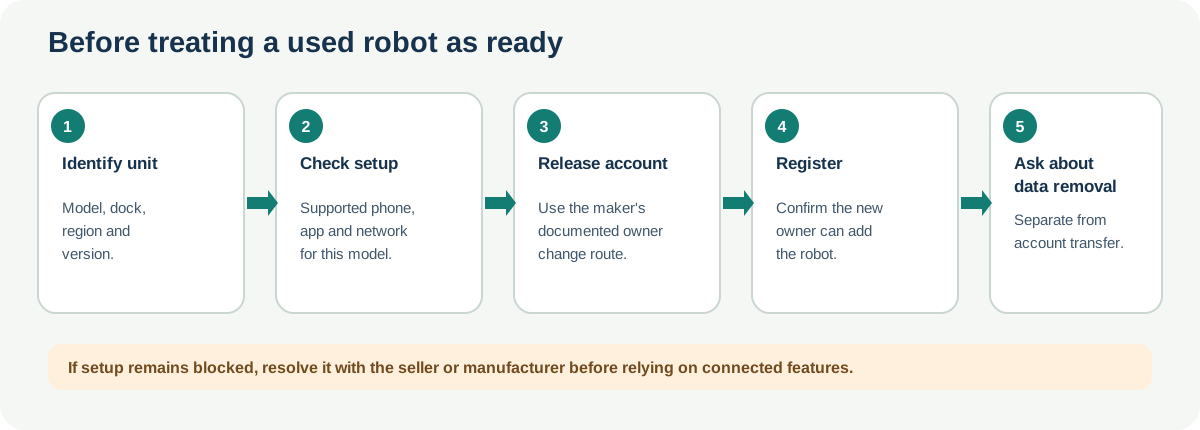
For a used candidate, record whether your phone can run the required app, whether your network meets the setup requirements, whether the prior account can be released, whether you can complete registration, and who will help if transfer remains blocked. For example, iRobot’s UK Roomba Home app setup guidance lists Mini among the supported models and describes a change-ownership flow when a robot is already registered to another account. Check that page for the current phone and network requirements for the exact Mini. This example does not establish setup or transfer practices for other brands.
For a Roborock candidate, the current software-security support policy lists security-update periods by type designation. Match the designation on the unit or its documentation to the current policy row; the policy does not provide a consumer-facing crosswalk to retail model names, and it says update timing may vary by region and model. Keep this separate from warranty, physical parts availability, repairability, app-feature continuity, and cleaning performance. A policy date is not proof that an individual device received each update.
For a focused named-family question, see the Bosch Spotless 2, DJI ROMO, Narwal Freo 20, and Roomba Mini comparisons. They report manufacturer-stated configurations for their named models and regions; they do not rank performance.
Build a shortlist you can revisit
| Check | Candidate A | Candidate B |
|---|---|---|
| Exact model/SKU and region | ||
| Requirement it must meet | ||
| Test source, method, and test year | ||
| Result that matches your floor or household | ||
| Dock needs and maintenance | ||
| Parts, service, and software support | ||
| Current price, seller, and date checked | ||
| Main downside or unresolved question |
Keep negative findings beside each candidate. A cheaper model may have the dock or support route you need, while a more capable model may add maintenance you do not want. Recheck regional availability, prices, warranty terms, and support pages immediately before purchase; they can change independently of a review score.
Sources & product documentation 14 references
- All Roomba Features and CompatibilityPrimary
- Replacement Kit for 11S Max, 15C Max, 30C Max, G20, G30, G30 EdgePrimary
- How we test robot vacuumsAuthoritative secondary
- How We Test Vacuums: Turning Data Into Objective ReviewsSpecialist
- How Consumer Reports Tests VacuumsSpecialist
- Best robot vacuum cleaners 2026: expertly tested and reviewedSpecialist
- Product Recalls and AlertsPrimary
- Software Security Support Policy for Robotic Vacuum Cleaners, Wet and Dry Vacuum Cleaner, Washer Dryers and Lawn MowerPrimary
- Buy DJI ROMO — DJI's First Flagship Robot VacuumPrimary
- Roomba Mini Robot Vacuum & Mop + AutoEmpty DockPrimary
- Setting up your Robot with the Roomba Home AppPrimary
- Roomba Home App Software Release NotesPrimary
- BCRDW3B Robot vacuum cleanerPrimary
- Next generation with even more power: The new Spotless 2 cleaning robots ensure a deep cleanPrimary